
Executive Summary: ServiceM8 15 "More Connected Than Ever"
The ServiceM8 15 release (September 2026 Update) represents one of the most substantial upgrades in the history of field service management software. Centred around the theme “More Connected Than Ever”, ServiceM8 15 introduces artificial intelligence directly into daily trade workflows, delivers total feature parity to Android users, overhauls scheduling, and provides automated financial tools for supplier management and pricing. Building upon previous major milestones like ServiceM8 14, ServiceM8 12, ServiceM8 11
Version 15 connects the office, field staff, suppliers, clients, and external AI tools into a unified operational platform.
Whether you run a plumbing, electrical, HVAC, or general trade business, this release tackles the biggest administrative bottlenecks: handling phone calls, tracking job diary notes, creating accurate quotes, scheduling staff, and managing supplier price increases.
Below is an exhaustive, keyword-rich overview of every major update and feature included in the ServiceM8 15 product launch, with direct links to official guides and resources.
1. Introducing Office Agent: Connected AI for the Office & Field
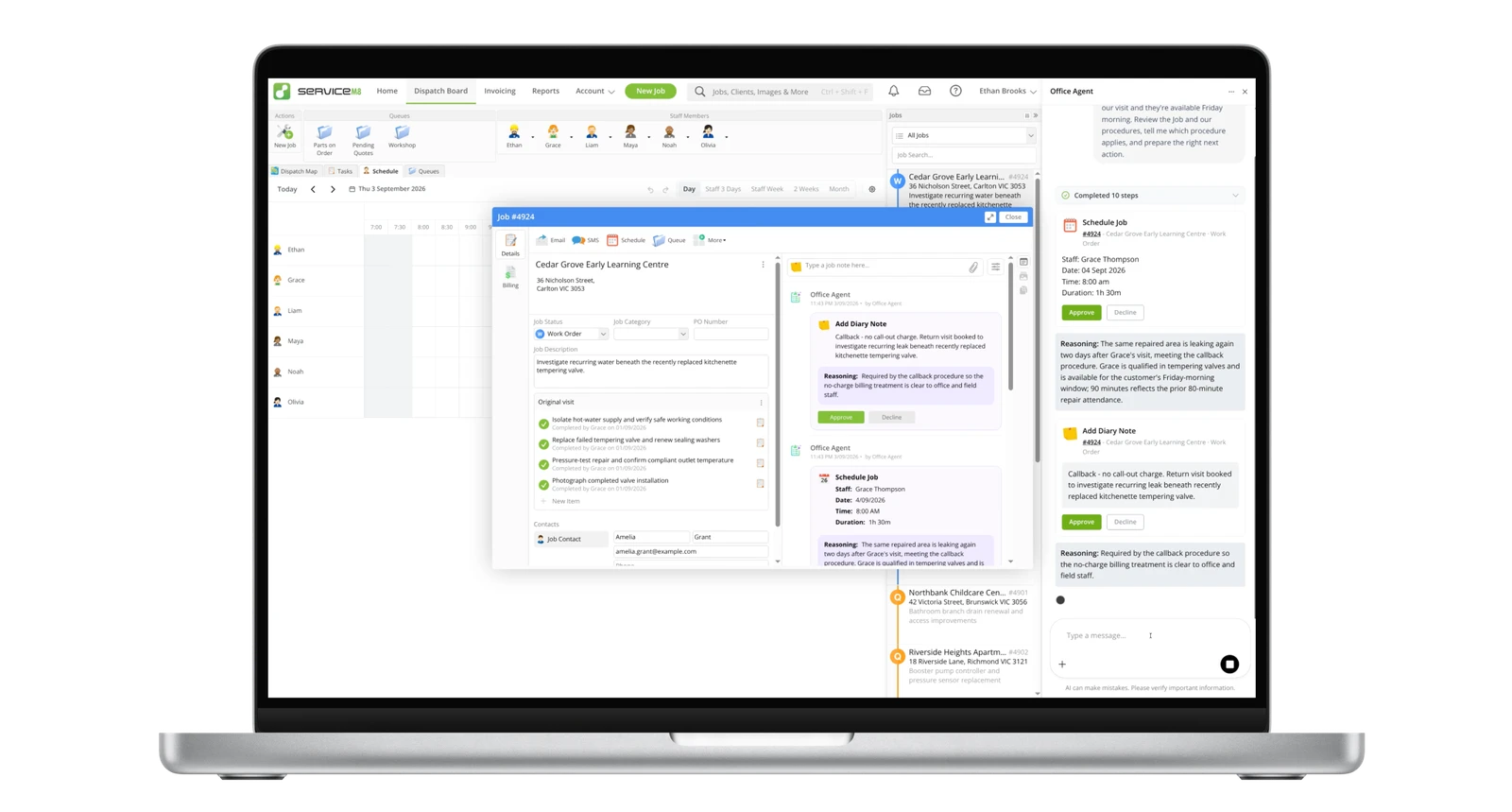
The centerpiece of ServiceM8 15 is Office Agent, a purpose-built AI assistant integrated directly into both the ServiceM8 Online Dashboard and mobile apps. Read the official announcement on Introducing Office Agent
Unlike standalone generic AI tools, Office Agent operates directly inside your active job cards, client history, and business knowledge base.
Key Capabilities of Office Agent:
- Side-by-Side Office Chat: Open Office Agent anywhere in the Online Dashboard without leaving your current job card or dispatch board. Ask questions like "What happened on this job and is it ready to invoice?" or "Find my highest value unaccepted quotes and draft follow-ups."
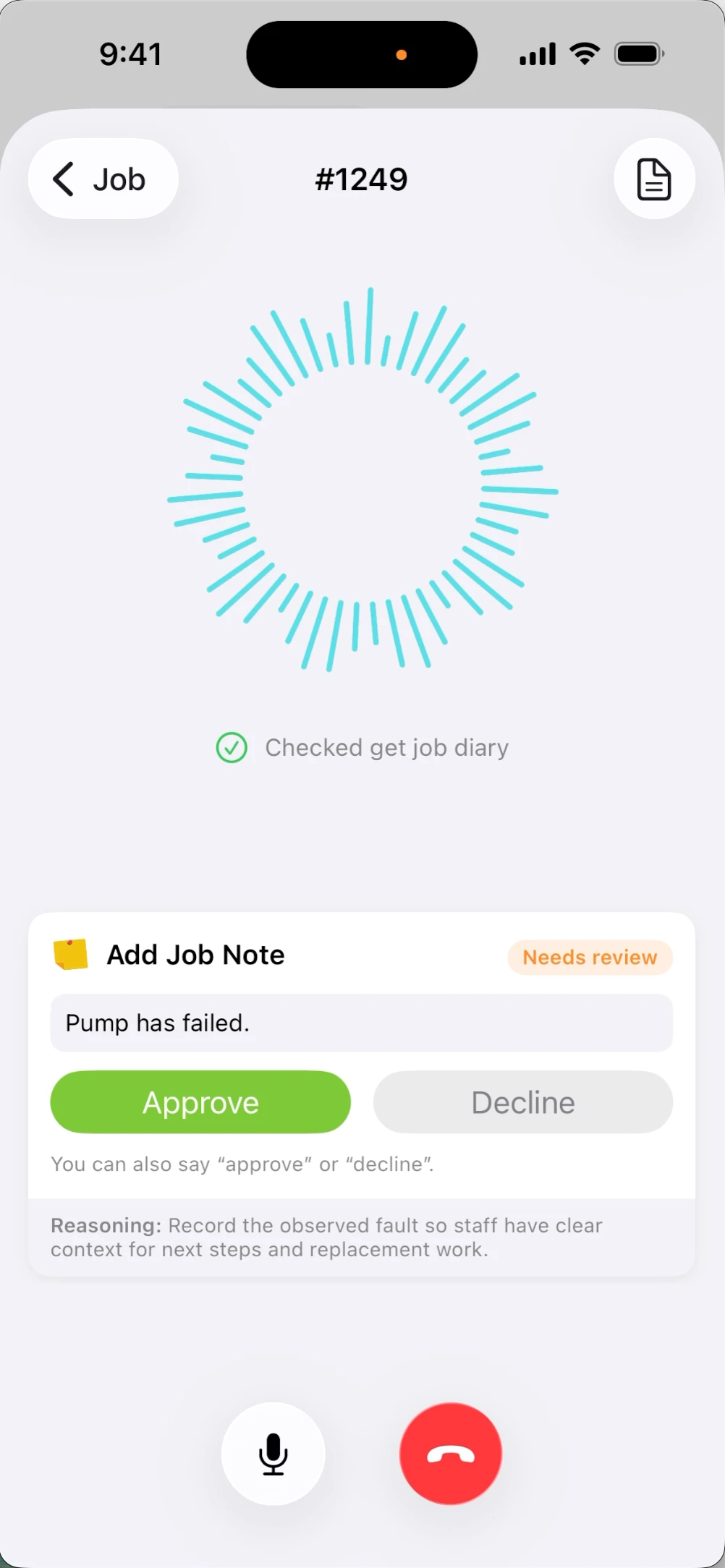
- Voice Conversations in the Field: Field technicians can talk to Office Agent from the ServiceM8 app directly from a job card to get rapid snapshots, review job diary history, or draft notes hands-free.
- Approval Actions: Office Agent never acts without permission. It prepares draft emails, SMS updates, quote/invoice drafts, queue transfers, or job status changes and presents them as Approval Actions for you to approve or decline with a single click.
- Scheduled Tasks: Set up recurring background routines for Office Agent via the Task Library. Office Agent can automatically scan open jobs every morning, flag delays, draft follow-ups, and notify you of required actions.
- Task Memory & Feedback: If you decline a suggested action and provide feedback (e.g., "We always assign solar installs to Sarah"), Office Agent stores that rule in Task Memory and applies it to all future runs.
- SOP Integration with Knowledge: Office Agent reads your company's documented policies in the Knowledge add-on (e.g., warranty procedures or refund policies) to align its recommendations with your standard operating procedures.
2. ServiceM8 for Android: Full Parity with iOS
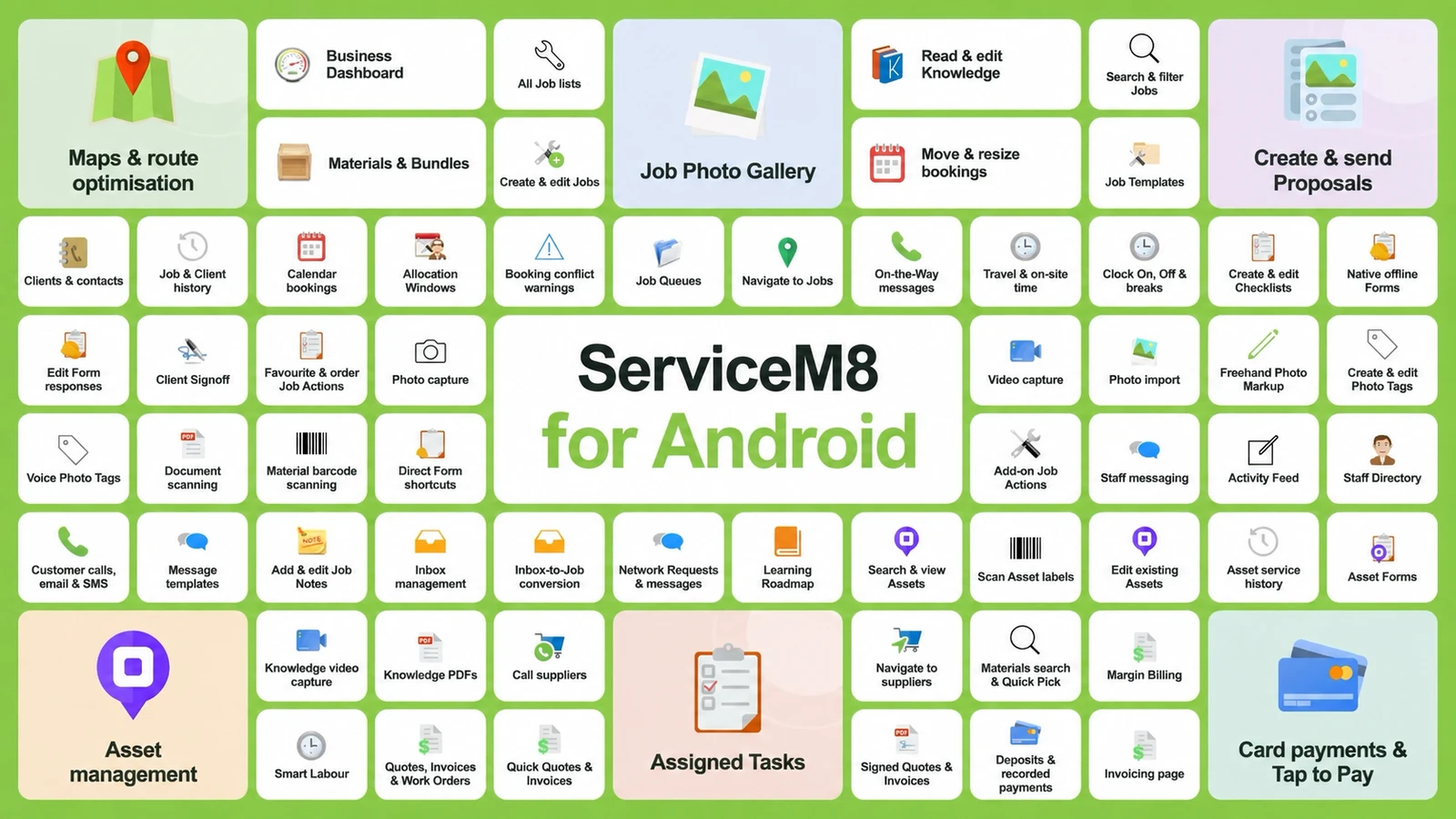
ServiceM8 15 delivers the largest update ever to the Android ecosystem, shedding the previous "Light" designation and bringing full feature parity with the iOS version. Check out full details in the guide About the ServiceM8 Android app
or download it directly from the Google Play Store
New Android Features in ServiceM8 15:
- Office Agent Integration: Full access to Office Agent chat, voice controls, and approval actions on Android devices.
- Complete Field Operations Toolkit: Added support for Photo Markup, Document Scanner, Material Barcode Lookup, Route Optimisation, Tap to Pay on Android, and Asset Management.
- Full Communication Suite: Access to Staff Chat, Note Threads & Emoji Reactions, Overhauled Notifications, and full Inbox Management.
- Proposals, Deposits & Invoicing: Create, edit, and send visual proposals, accept deposits, and manage billing directly from Android phones.
3. Redesigned Staff Schedule & New Booking Window Experience
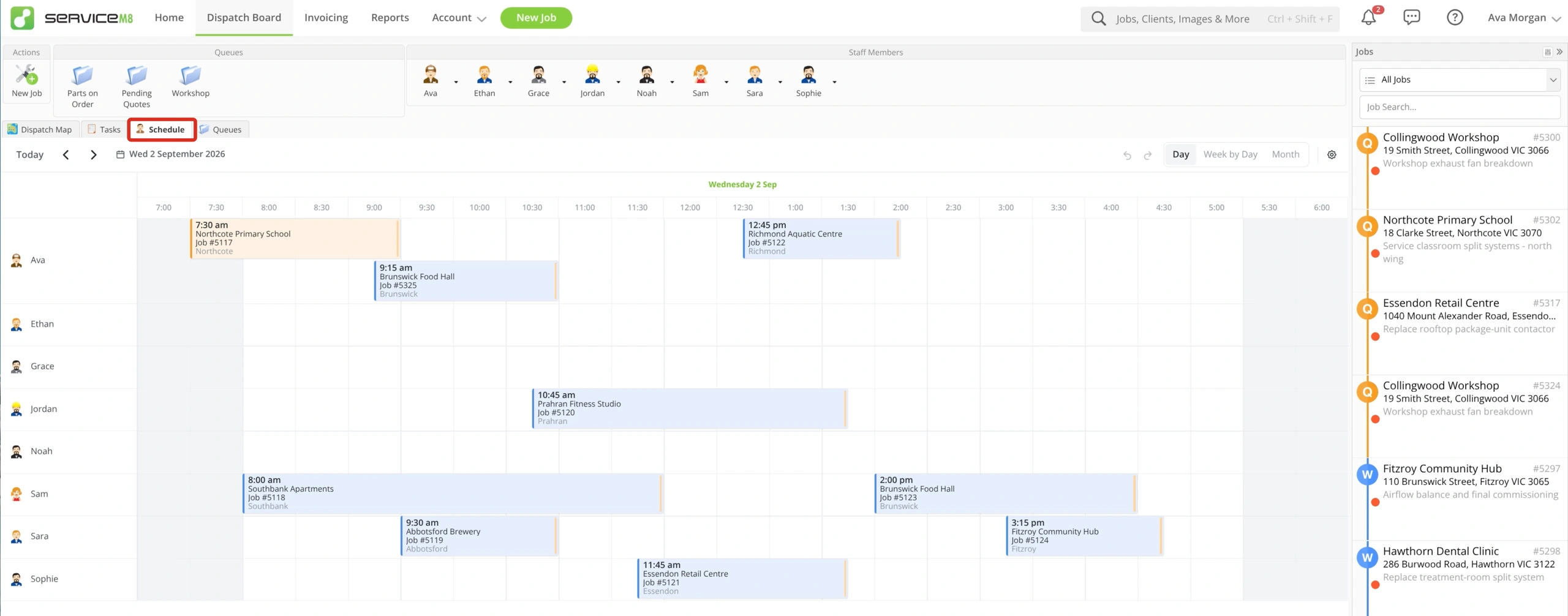
Managing dispatch and team schedules is faster and more flexible in ServiceM8 15. Learn how to optimize your dispatch in Using the Staff Schedule in the Online Dashboard
Scheduling Enhancements:
- Multi-View Display: Switch effortlessly between Day, Week by Day, Week, Month, and Customisable Multi-Week schedule views.
- Intelligent Overlap & Visibility Handling: Improved visual handling of overlapping bookings, weekend displays, staff ordering, and default staff filters.
- Drag-and-Drop & Shortcuts: Drag bookings to reassign staff or reschedule times, with instant undo/redo functionality and booking shortcuts.
- New Booking Window Experience: Align staff capacity with client availability in one unified booking window, reducing scheduling conflicts and travel time.
- Show Booking on Schedule: Click "Show on Schedule" from any job diary entry to instantly highlight that booking on the calendar.
The new booking window aligns staff capacity with client availability in one unified view. Learn more at How to schedule a job from the Job card
4. Enhanced Communication & Team Collaboration
ServiceM8 15 introduces major communication tools to align office administrators, field technicians, and clients.
1. Staff Chat
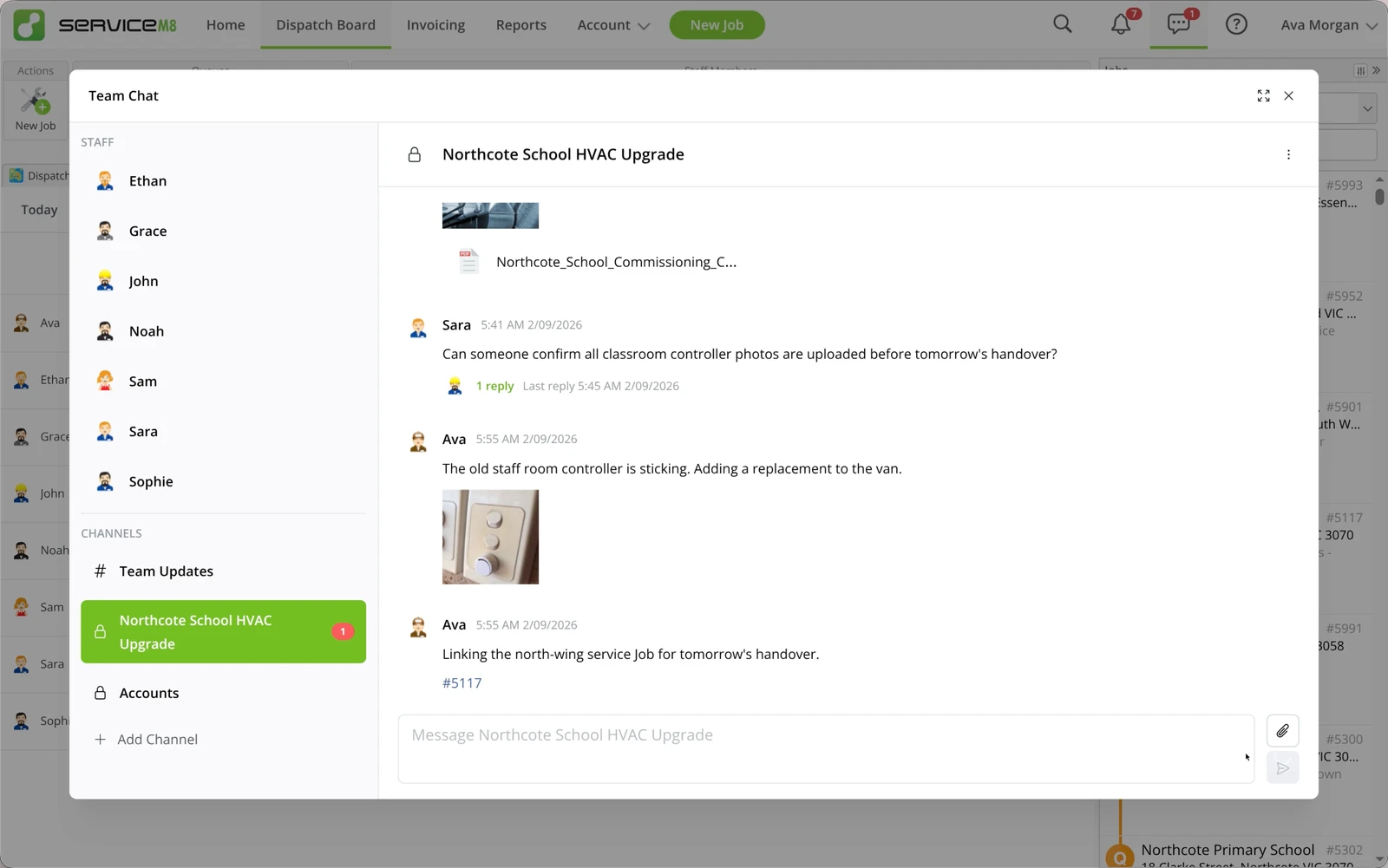
- Native In-App Messaging: Dedicated team chat built right into ServiceM8, featuring direct messages, group channels, private channels, and thread replies.
- Job Context Integration: Link specific jobs directly inside staff chat threads so team discussions remain tied to job numbers.
Explore How to use Staff Chat
2. Note Threads & Emoji Reactions
- Threaded Job Notes: Reply directly to specific job diary notes, keeping discussions organized around specific updates rather than clogging the main diary.
- @Mentions & Emoji Reactions: Mention team members to send instant notifications, and acknowledge job updates quickly with emoji reactions.
- Expanding Note Field: The job note input box now expands dynamically as you type for easier drafting of long notes.
Read How to reply and react to Job Diary notes
3. Notifications Management
- Expanded Notification Panel: A spacious notification drawer showing full context, message snippets, and activity filters (All, Unread, Mentions).
- Searchable Notification Page: Search up to 12 months of notification history with options to mark individual items or all items as read/unread.
Learn How to manage notifications in the Online Dashboard
4. Email & Messaging Enhancements
- Custom Domain Email Sending: Authorise ServiceM8 to send quotes, invoices, and job updates using your business's own domain name (e.g., quotes@yourbusiness.com) via SPF/DKIM authentication.
- In-App Email Forwarding: Forward emails directly from the ServiceM8 mobile app.
- ServiceM8 Phone Caller Blocklist: Manage blocked numbers directly in ServiceM8 Phone.
- Custom Staff Avatars: Personalise profiles with custom staff avatars in the ServiceM8 app.
Configure custom domain sending with the step-by-step guide on How to send ServiceM8 emails from your existing domain
More email & messaging guides: How to forward an email from the ServiceM8 app, How to block nuisance callers in ServiceM8 Phone, How to change your staff avatar
5. Advanced Field Tools & Visual Proposal Enhancements
1. Toolbox Meetings (Knowledge Add-on)
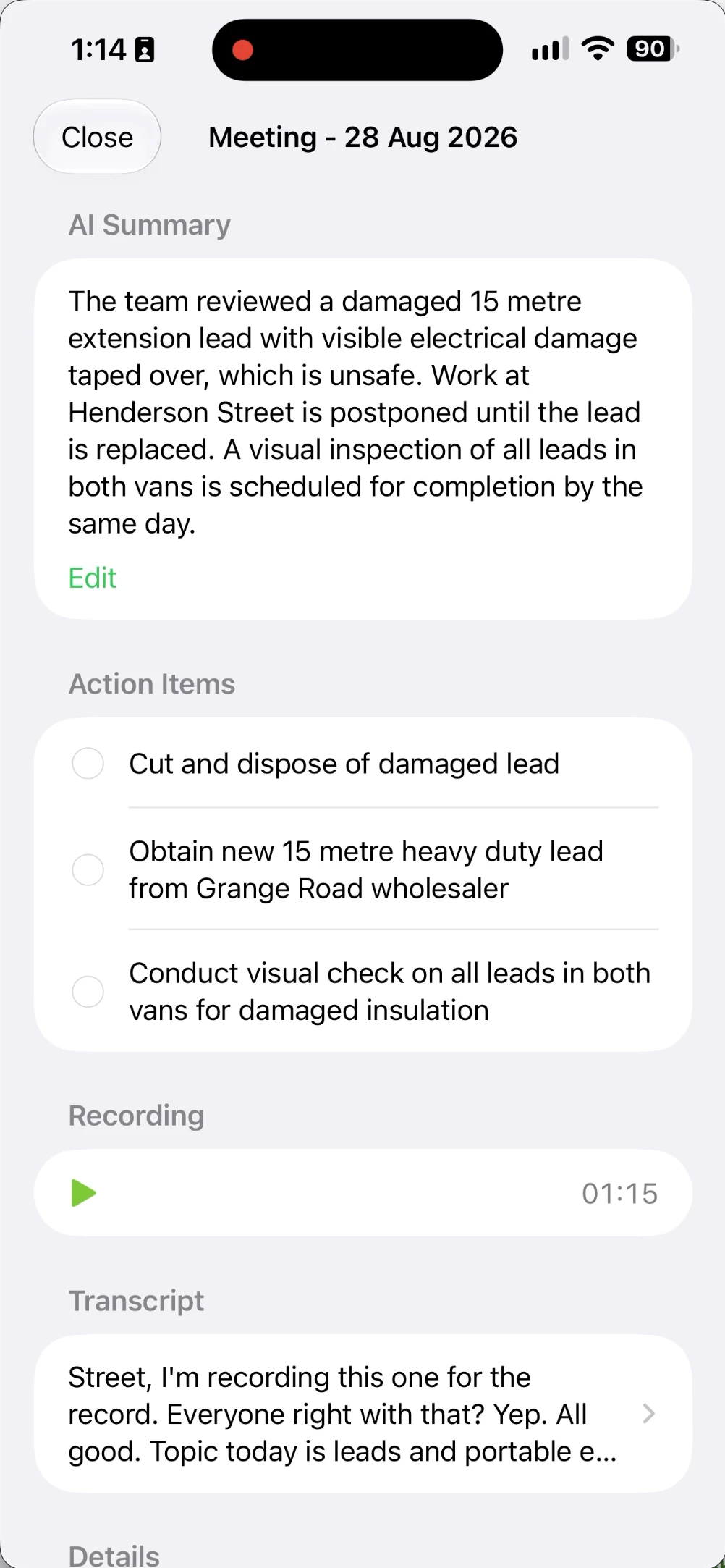
Record, transcribe, and document site safety pre-starts and team briefings. Learn How to record a toolbox meeting in Knowledge
Select attending staff, tap record, and ServiceM8 will automatically transcribe the discussion and store a concise summary article in Knowledge with attached audio.
2. Imagine AI Photo Visualisations
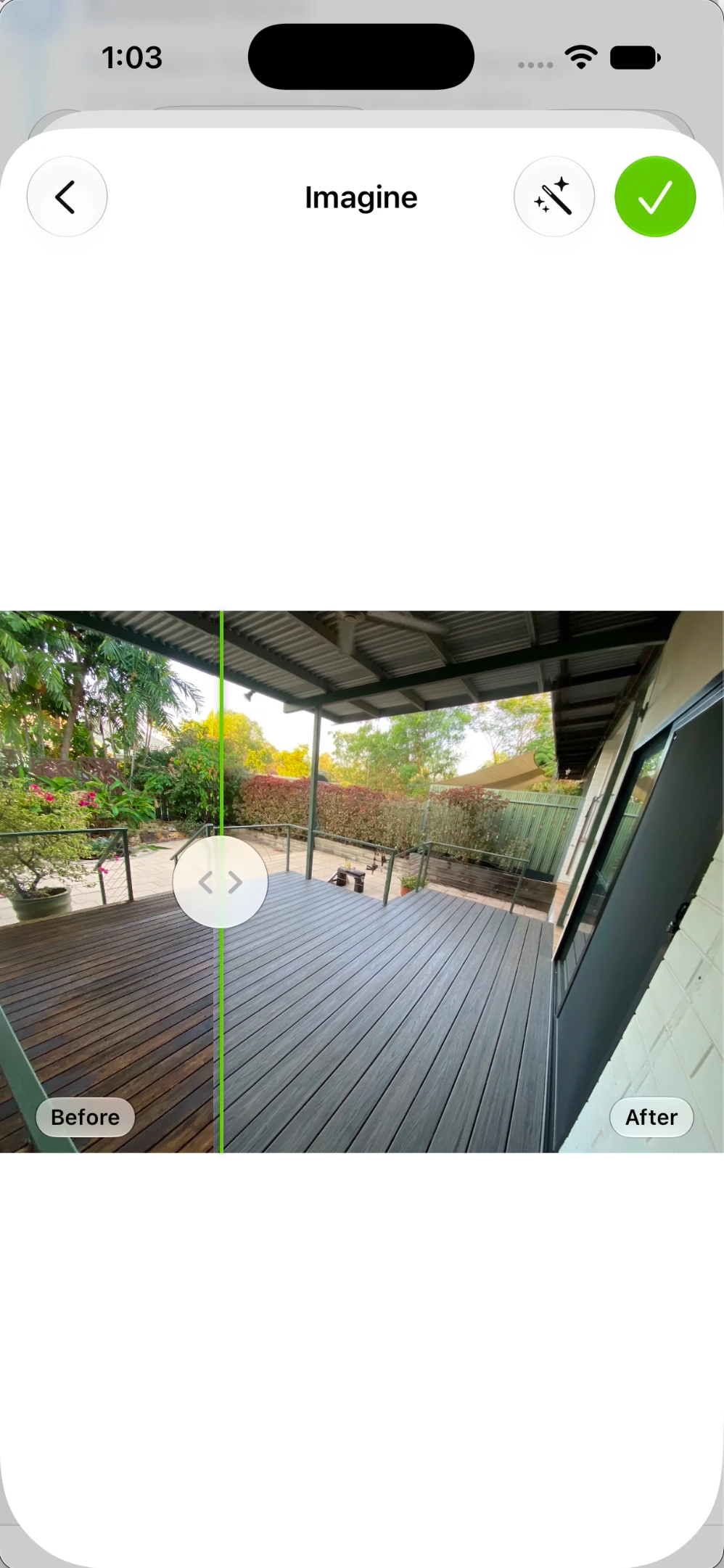
Turn job photos into realistic AI-generated visualisations of proposed modifications (e.g., showing a client what a new air conditioning unit or bathroom layout will look like). See How to use Imagine with job photos
3. Photo Markup Online
Annotate job photos directly on desktop web browsers. Draw lines, arrows, shapes, and text callouts onto photos; saved markups create a new photo in the job diary while preserving the original photo. Read How to mark up job photos in the Online Dashboard
4. Room Scan with Wall Colours
The 3D LiDAR Room Scan feature now captures real wall colours, making room measurements and spatial layouts easier to recognize. Explore How to use Room Scan
5. In-App Materials, Bundles & Proposals
- Materials in App: Search, edit, and update your full Materials & Services price list directly from mobile devices.
- Bundle Image Support: Attach images to bundles so clients can visually compare options inside ServiceM8 Proposals.
- Material Edit History: View complete audit logs in the job diary showing who changed item quantities or prices.
Detailed guides: How to manage Materials and Bundles in the app, How to use the Bundles Add-on, How to review item changes in a job's Edit History
6. Supplier Management & Automated Pricing Strategies
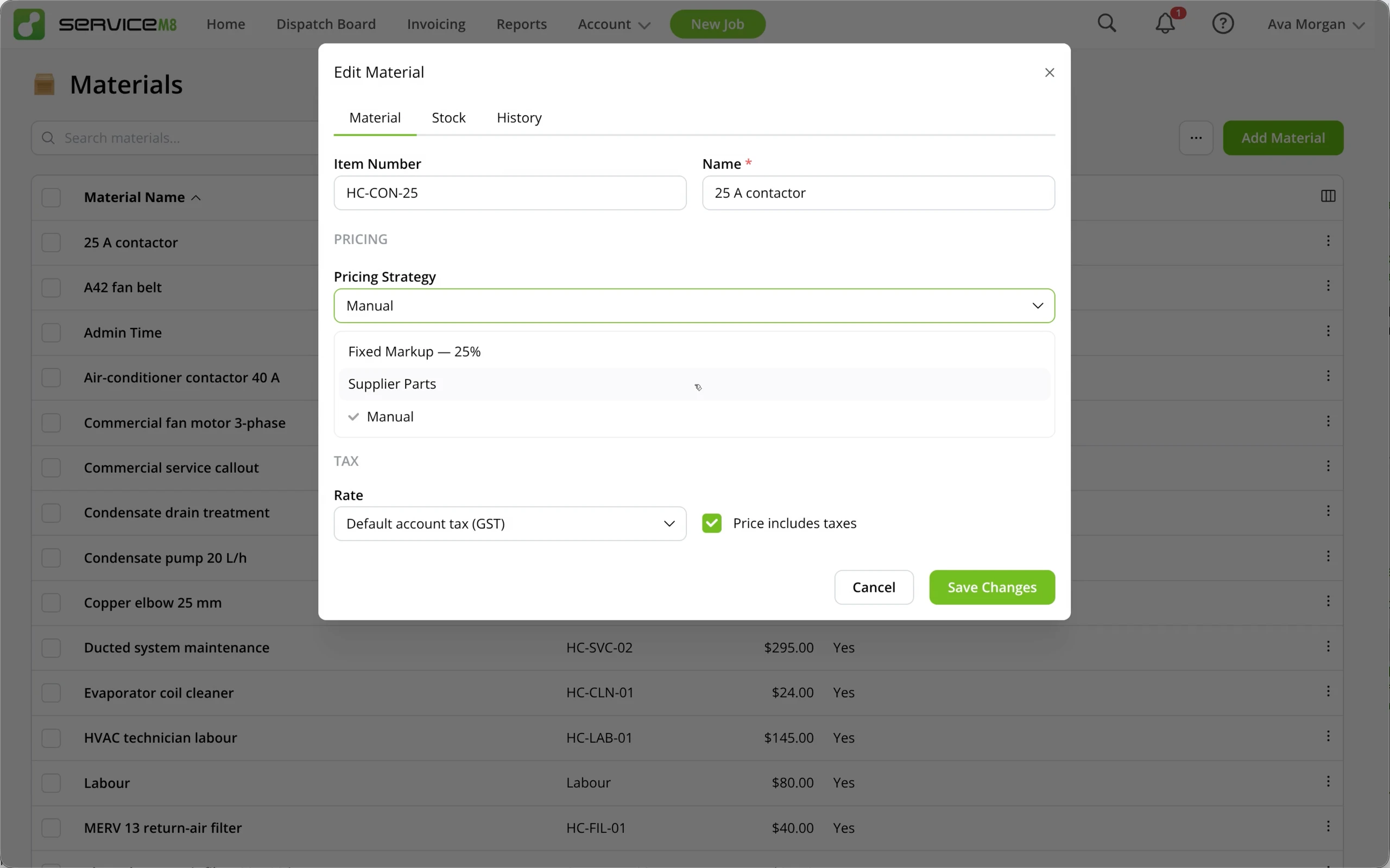
ServiceM8 15 automates margin management and supplier price list updates. Detailed instructions can be found in How to manage supplier price lists
- Automated Supplier Imports: Ingest supplier price sheets automatically via unique email import addresses.
- Pricing Strategies: Apply automated markup rules (Fixed Markup or Tiered Markup) across imported price lists.
- Bulk Strategy Application: Enforce pricing rules globally or per-supplier to maintain profitable margins across materials automatically.
More supplier guides: How to import a supplier quote, How to increase Items & Services prices in bulk
7. ServiceM8 Pay & Financial Surcharge Compliance
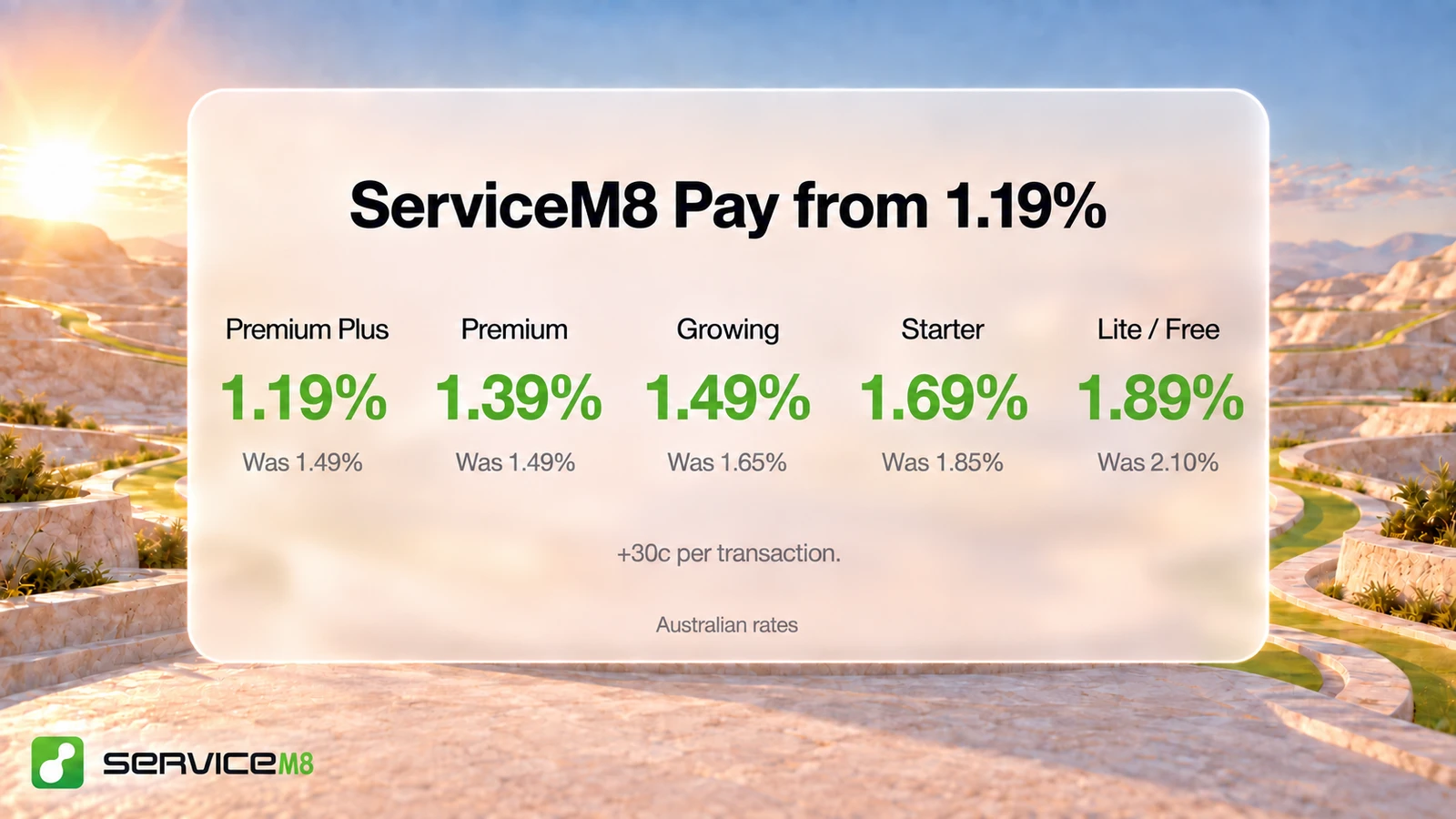
- Lower Processing Rates: Significantly reduced card transaction fees for ServiceM8 Pay users.
- Card Payment Limits: Set threshold preferences to hide card payment options on high-value invoices online to avoid excessive processing fees.
- Australia Card Surcharge Ban Readiness: ServiceM8 15 includes automatic compliance rules for Australia's upcoming card surcharge regulations.
Relevant guides: ServiceM8 Pay card processing fees & payout speed, How to prepare for card surcharge changes in Australia
8. Developer Ecosystem: Addon Kit CLI & Enhanced MCP Server
For developer partners, IT consultants, and tech-savvy trade businesses, ServiceM8 15 opens up unprecedented customisation capabilities.
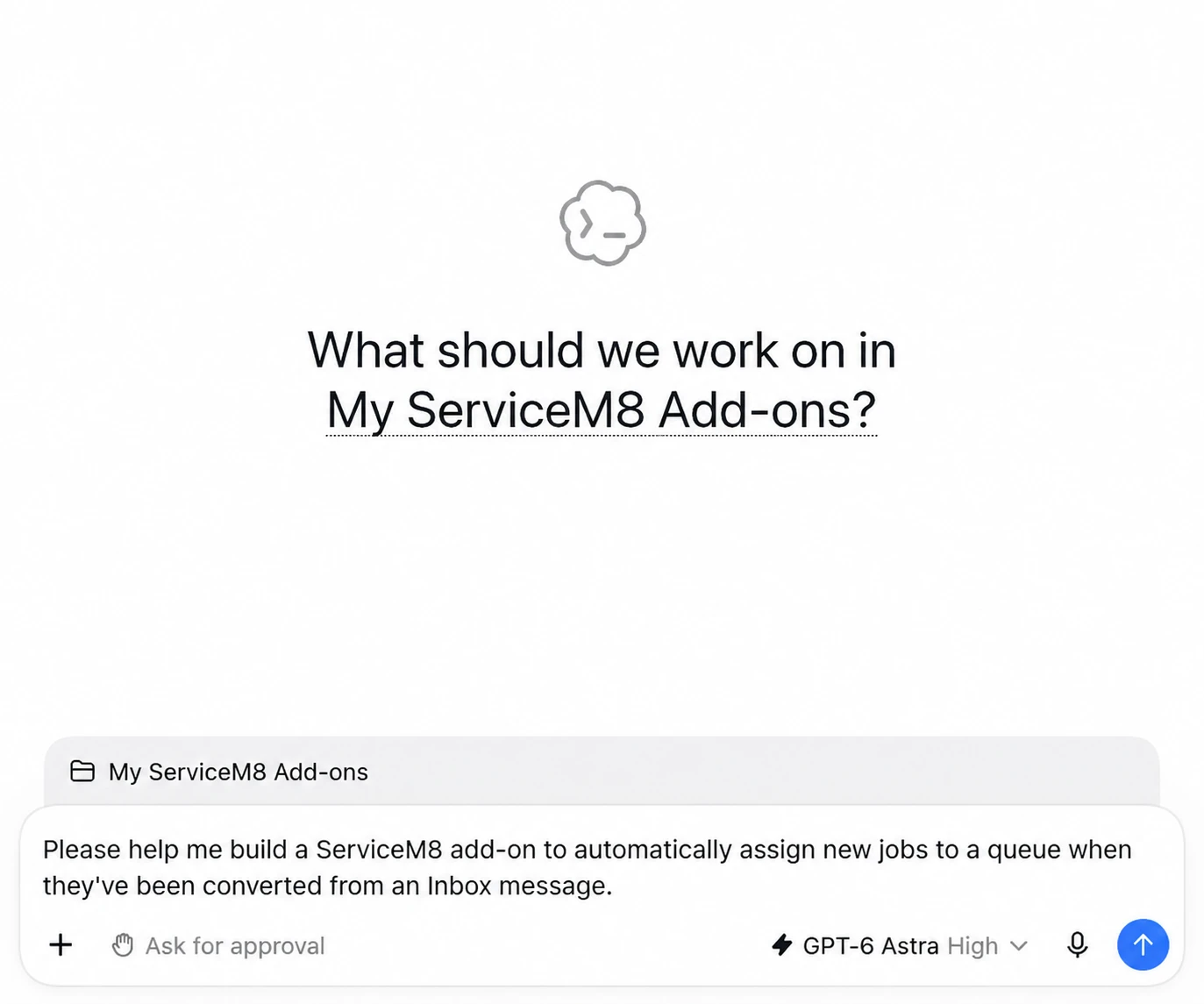
- ServiceM8 Addon Kit CLI (@servicem8/addon-kit): A modern command-line interface to build, test, and deploy private ServiceM8 add-ons directly from your terminal using simple JavaScript functions.
- AI-Assisted Add-on Development: Designed to work seamlessly with AI coding tools (such as Claude Code and ChatGPT), allowing you to describe a custom workflow and compile a private add-on instantly.
- Enhanced Model Context Protocol (MCP) Server: Updated MCP connector for ChatGPT and Claude, enabling external AI tools to query jobs, check staff schedules, list queues, and draft communications securely.
Developer resources: ServiceM8 Addon Kit Developer Portal, npm (@servicem8/addon-kit), Connect ServiceM8 to ChatGPT or Claude
Comparison Table: ServiceM8 14 vs. ServiceM8 15
| Feature Area | ServiceM8 14 | ServiceM8 15 (September 2026) | Official Guide |
|---|---|---|---|
| Artificial Intelligence | Basic custom reports helper | Office Agent (Dashboard Chat, Mobile Voice, Scheduled Tasks, Approval Actions, Task Memory) | Office Agent Guide |
| Android Experience | ServiceM8 Light (Limited feature set) | ServiceM8 for Android (Full parity with iOS app) | Android App Guide |
| Schedule View | Standard day/week dispatch | Redesigned Schedule (Day, Week by Day, Month, Multi-Week, Overlap handling) | Staff Schedule Guide |
| Internal Chat | Basic job notes | Staff Chat (Channels, Direct Messages, Threads) + Note Threads & Reactions | Staff Chat Guide |
| Supplier Price Lists | Manual import mapping | Automated Pricing Strategies (Fixed & Tiered Markups, Auto-imports) | Supplier Pricing Guide |
| Developer Tools | Standard Webhooks & REST API | Addon Kit CLI (@servicem8/addon-kit) + Enhanced MCP Server | Developer Portal |
| Email Identification | Sent via generic ServiceM8 domain | Custom Business Domain Sending (DKIM / SPF authorization) | Domain Email Guide |
| Safety & Meetings | Manual forms | Toolbox Meetings (Automated audio transcription & Knowledge summary) | Toolbox Meetings Guide |
How to Activate ServiceM8 15
To start using ServiceM8 15 features in your business:
- Log into your ServiceM8 Online Dashboard on web browser.
- Navigate to the ServiceM8 15 Activation Link in account settings or visit the official September 2026 Update Launch Page.
- Click Activate ServiceM8 15 to unlock Office Agent, the new Staff Schedule, Staff Chat, and updated mobile features.
- Update the ServiceM8 app on your iOS or Android devices via the Apple App Store or Google Play Store.
Activation links: September 2026 Update Launch Page, Activate ServiceM8 15, Apple App Store, Google Play Store
Frequently Asked Questions (FAQ)
What is ServiceM8 Office Agent?
Office Agent is an AI-powered assistant built directly into ServiceM8. It helps office administrators and field staff answer job queries, draft quotes and invoices, run scheduled background tasks, and prepare job actions for human review. Learn more in the Office Agent Overview
Is ServiceM8 for Android fully featured now?
Yes! In ServiceM8 15, the Android application received its largest update ever, gaining full feature parity with the iOS app, including Office Agent, Staff Chat, Photo Markup, Document Scanner, Route Optimisation, and Tap to Pay. Read the Android App Feature Guide
How do Pricing Strategies work with supplier price lists?
When importing supplier price lists, you can set Fixed or Tiered Markup strategies. ServiceM8 automatically calculates sell prices across your Materials & Services catalog whenever supplier costs update. See Supplier Price List Management
Can I send emails from my own domain in ServiceM8?
Yes. With the Website and Email update in ServiceM8 15, you can authorize ServiceM8 to send quotes, invoices, and job notifications using your business's custom domain name. Follow the setup guide on Custom Domain Email Authorization
For further updates and previous release breakdowns, visit our blog archives covering ServiceM8 14, ServiceM8 12, ServiceM8 11