These reference notes and resource assets are compiled directly from the ServiceM8 Launch Event 2025 and September 2025 Update launch documentation. All embedded help links, feature assets, and media references reflect official ServiceM8 14 resources.
1. Executive Summary & Activation Links
ServiceM8 14 represents a major platform update focused on AI-driven automation, unprecedented operational visibility, and deep systemization of trade business workflows. Marking ServiceM8's 15-year anniversary, the release introduces autonomous AI assistants, advanced custom reporting, route optimization, and enhanced mobile tracking.
Launch event video & overview: Watch the Launch Event
Account activation: Activate ServiceM8 14 Features
2. Media, Visual & Graphical Assets
ServiceM8 14 incorporates rich graphical, visual, and media handling capabilities directly into field operations and customer interactions.
Imagine Visual AI & Photo Mockups
- Visual Concept Generation: Open a job photo in the Diary, choose Imagine, and type a plain-text description of a planned installation or renovation.
- Client Concept Sharing: Generates visual outcome mockups directly on site photos so technicians can show clients exactly what the finished job will look like before starting.
Photo Markup & Overlay Assets
- Text Annotations: Add labels, text callouts, and explanatory notes directly onto site photos and scanned documents.
- Geometric Shapes: Draw precise circles, squares, arrows, and lines to highlight work areas or defects.
- Drag-and-Drop Image Overlays: Drag images onto existing site photos or documents to create clearer work instructions.
Help resource: How to mark up photos in the ServiceM8 app
SMS Media & File Attachment Links
- Two-Way Media Messaging: Field staff and clients can exchange photos, completed work reports, and product brochures via SMS links.
- Interactive Customer Web Viewer: Clients tap a secure SMS link to open a clean web thread displaying all shared photos, documents, and PDF attachments at no extra cost.
Help resource: How to use ServiceM8's Two-Way SMS
Liquid Glass UI & iPadOS Workspace Assets
- Liquid Glass Theme (iOS 26): Light, translucent UI design with modern buttons and tabs that keep job details front and center.
- iPadOS Multi-Window Workspace: Desktop-style top menu controls, side-by-side app window resizing, and direct drag-and-drop image transfers.
GPS Activity Maps, Timelines & Routing Visuals
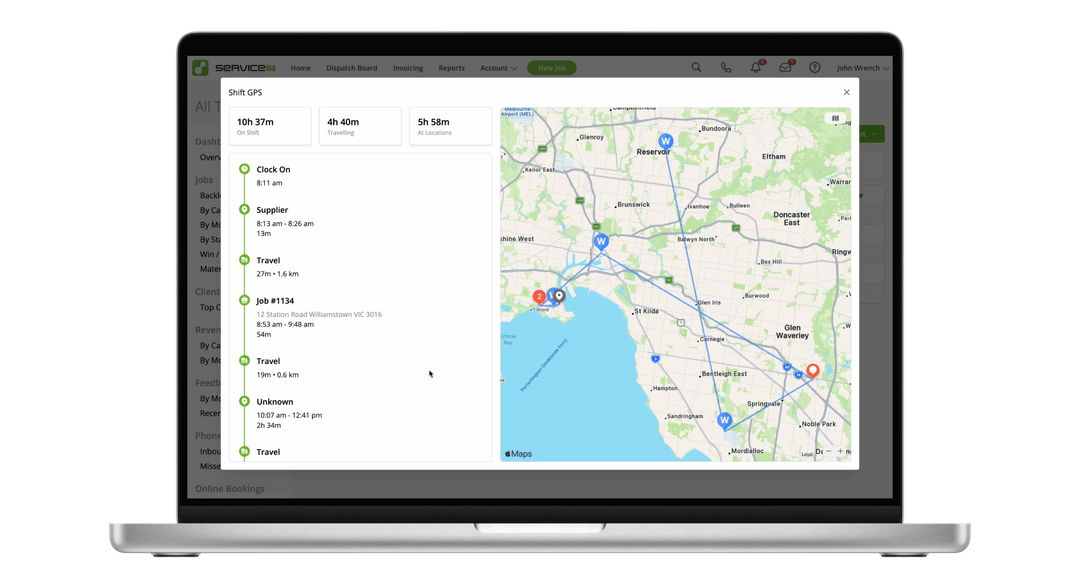
- Shift GPS Interactive Map: Chronological map and timeline charting Clock On/Off, travel routes, supplier visits, and job check-ins.
- Auto Routing Map Overlay: Route comparison visuals on the iOS Map view showing distance/fuel savings and live midday re-routing.
- Dispatch Map Supplier Overlays: Saved supplier branch locations mapped directly on the Dispatch Board for 1-click navigation and proximity checks.
- CarPlay Schedule Interface: Displays allocated windows and fixed bookings directly on vehicle dashboard screens.
Help resources: How to use Auto Routing to optimise daily schedules, How ServiceM8 works with CarPlay, How to use the Team Timesheet & Shift GPS reports
Reporting Graphical Charts & Visual Dashboards
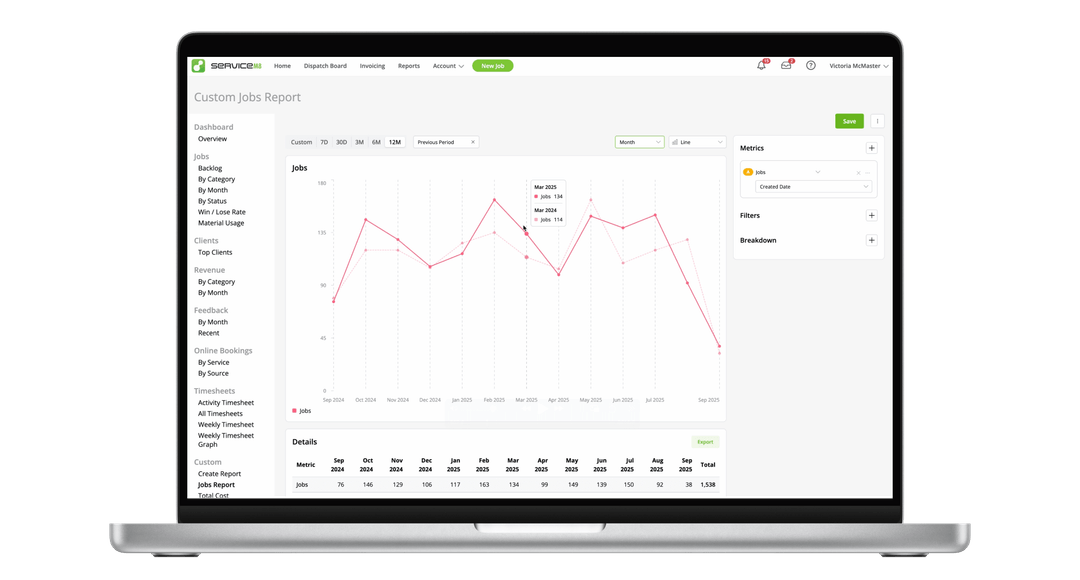
- Chart Types: Line, Bar, Column, and Metric Dashboard visual charts with custom time grouping and previous period comparisons.
Help resource: How to create Custom Reports
3. Artificial Intelligence & Autonomous Operations
ServiceM8 Phone Agent
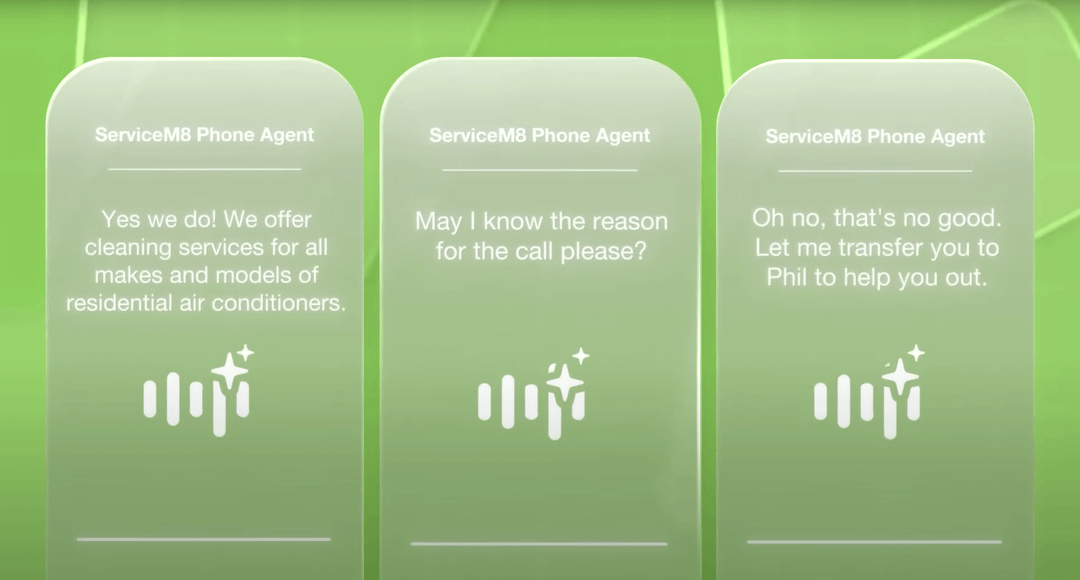
- Virtual Receptionist: AI phone assistant that answers incoming calls, takes messages, answers FAQs, or triages emergency calls.
- Spam Deflection: Automatically screens telemarketers and unwanted sales calls.
- Custom Instructions & Schedules: Set procedures for business hours, after-hours, voicemail, or emergency protocols.
- Transcripts & Notifications: Delivers call summaries, audio recordings, and full transcriptions to the Inbox.
- Plans & Availability: Free after-hours coverage for existing ServiceM8 Phone users; 24/7 coverage on Connect Plus and Unlimited plans.
ServiceM8 Office Agent
- Autonomous Admin Assistant: Virtual team member inside ServiceM8 that handles recurring administrative decision-making.
- Proactive Workflows: Chases overdue quotes and invoices, drafts customer replies, checks team schedules, and flags backlog jobs.
- Approval Controls: Sends findings and recommendations for business owner review before executing actions.
AI Tools & Ecosystem Integrations
- Smart Report Helper: Natural language AI assistant that generates custom data reports instantly from text prompts.
- Smart Writing Helper: Automatically drafts email subject lines alongside email body copy.
- Model Context Protocol (MCP): Connects AI agents like ChatGPT or Claude directly to ServiceM8 to query live job status and pricing.
Help resources: How to use the Smart Writing Helper, How to connect ServiceM8 to ChatGPT with MCP
4. Custom Reporting Engine
- Universal Access: Powerful custom reporting engine provided free across all account tiers.
- Granular Filtering & Grouping: Filter by Job Status, Category, Client, Profit, or custom fields, and break down by Staff Member, Badge, or Location.
- Aggregate by Field: Group numerical metrics side-by-side (e.g., comparing Total Invoice Amount against Total Cost per staff member).
- Data Export: CSV table exports for further spreadsheet analysis.
Help resource: How to create Custom Reports
5. Intelligent Scheduling, Field Visibility & GPS Tracking
Auto Routing Add-on
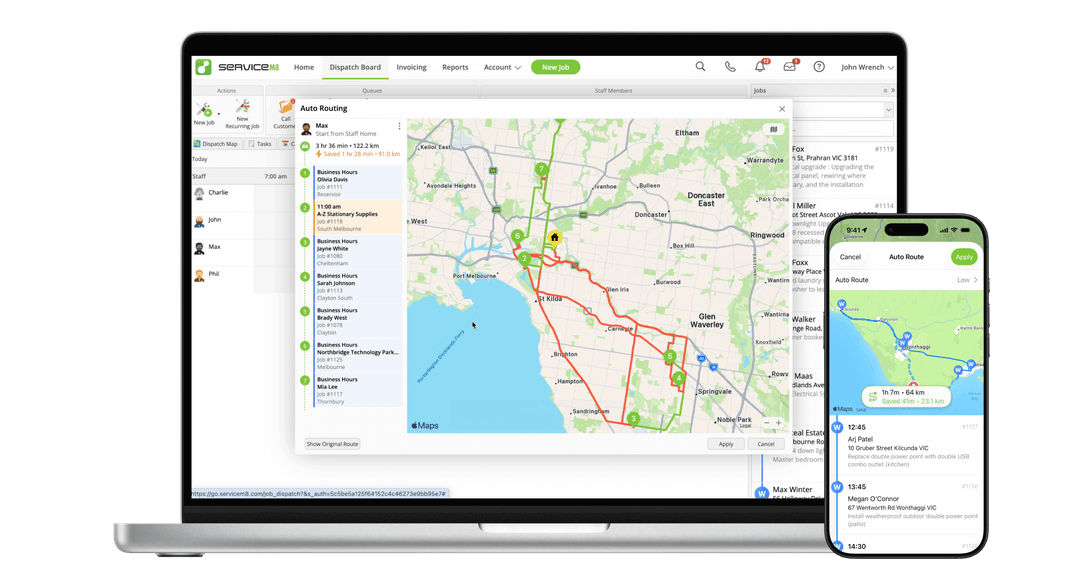
- 1-Click Route Optimization: Optimizes daily job sequences to save driving time and fuel.
- Flexible Booking Logic: Optimizes allocation windows while locking fixed-time bookings, or reorders fixed appointments based on user settings.
- Home or Office Anchors: Routes can start and end from either office locations or staff home addresses.
- Midday Re-optimization: Runs on the iOS app Map view, ignoring completed jobs to re-route remaining stops.
Help resource: How to use Auto Routing to optimise daily schedules
Real-Time Visibility & Job Checkout Reports
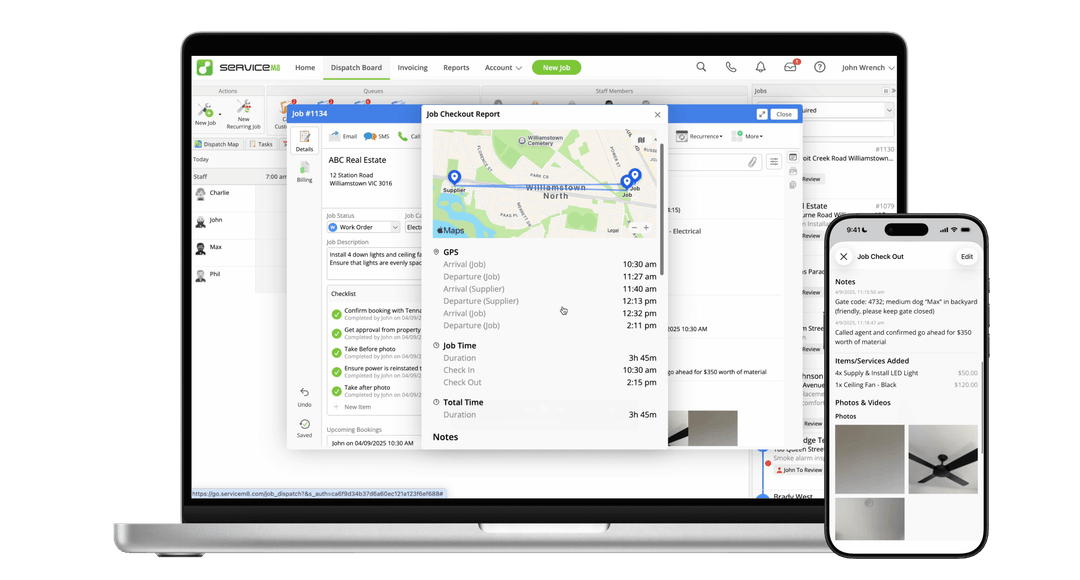
- Status & Collaboration Indicators: Live indicators showing Navigating (with ETA), Checked In (with a visual progress fill timer), and live icons when other staff open the same job card.
- Job Checkout Report: Tap recorded time in the job Diary (online or mobile) to view GPS arrival/departure timestamps, notes, items added, checklist completion, forms, asset services, and tagged photos/videos.
- On-Site & Retroactive Time Editing: Technicians and managers can adjust check-in/out times directly in the app, cross-referencing GPS records.
Help resources: How to find a Job Checkout Report, How to edit Check-In data
Team Timesheets & Shift GPS Report
- Team Timesheet: Weekly view comparing Job Time vs. Shift Time for all staff members.
- Shift GPS Report: Daily map and chronological timeline detailing Clock On/Off, travel, location visits, and job check-ins.
Help resource: How to use the Team Timesheet & Shift GPS reports
6. Mobile App & Job Card Upgrades
- Apply Job Templates Post-Creation: Apply templates (pre-filled descriptions, badges, pricing) to existing jobs anytime.
- Save to Diary: Save Quotes and Invoices to the job Diary without drafting an email.
- Checklists & Tasks: Hover-and-click assignment, reminder shortcuts (End of Today, Tomorrow Morning, Monday Morning), completion alerts, and cross-job copy/paste.
- Auto-Name Scanned PDFs: Automatically generates descriptive filenames for scanned documents in the iOS app.
- ServiceM8 Lite for Android: Upgraded to staff-level capabilities (create/schedule jobs, manage queues, message clients, clock on/off shift, multi-photo capture, issue quotes/invoices).
- Tap to Pay on iPhone: Contactless card payment acceptance expanded to New Zealand.
Help resources: How to apply a job template to an existing job, How to save a quote or invoice to the diary, How to create and use Checklists, How to scan paper documents using the app, Tap to Pay on iPhone with ServiceM8
7. Materials, Pricing & Supplier Management
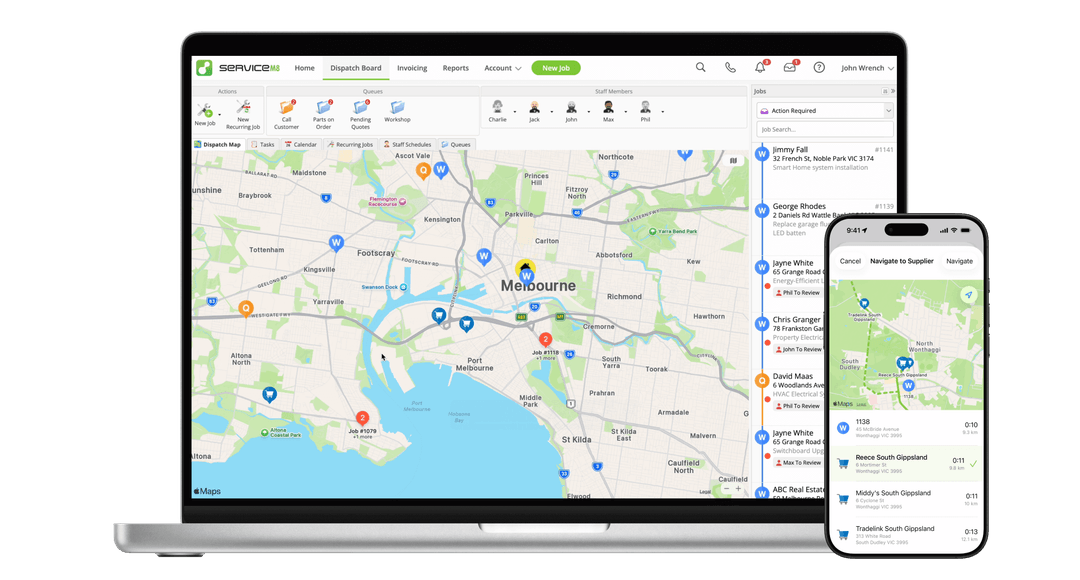
- Suppliers Add-on: Directory to store branch details, display locations on the Dispatch Map, speed-dial, and navigate to nearby branches.
- Save-As-You-Go Pricing: Configure system rules to determine whether job card item price edits update the database permanently, stay isolated, or update only when prices increase.
- Outdated Price Warning: Displays warnings on older quotes if database item costs have changed, providing 1-click price updates.
- Item Duplication Control: Security role restrictions to prevent field staff from creating duplicate database items.
- Simple Back Costing: Compares estimated labor and material costs from approved quotes against actual time and materials used on completed jobs.
- Automated Supplier & Invoice Import: Enhanced column detection, broader price list file support, and automated Diary matching for supplier invoices.
Help resources: How to call, email, or navigate to your Suppliers, How to set up Save-As-You-Go item pricing, How to prevent staff members from creating items, How to use the Automated Supplier Import Add-on, How Supplier Invoice Importing works, Job Costing Overview
8. Documents, Knowledge & Ecosystem Integrations
- Knowledge PDF Support: Upload PDF documents directly into the Knowledge library with automated mobile layout optimization.
- Proposals Upgrades: Subtotal-only mode (hide itemized item pricing), full version revision history with 1-click restore, and client PDF downloads.
- CSV Bulk Asset Import: Import asset databases from CSV files and link physical QR code labels on site in seconds.
- Staff Leave & Public Holiday Sync: Plain-text leave entry on the Dispatch Board and 1-click public holiday calendar sync.
- n8n Workflow Automation: Pre-built ServiceM8 triggers and actions for no-code workflow automation inside ServiceM8 or with external apps.
Help resources: How to attach and use PDFs as Knowledge, How to create and send Proposals Online Dashboard, How to view and restore previous versions of a Proposal, How clients can download a Proposal as a PDF, How to bulk import Assets from a CSV spreadsheet, How to add Staff Leave, How to add business closed dates and sync public holidays, How to connect ServiceM8 to n8n
9. Official Documentation & Asset Resource Index
How to Activate ServiceM8 14
To start using ServiceM8 14 features in your business:
- Log into your ServiceM8 Online Dashboard via a web browser.
- Navigate to Settings > ServiceM8 14 Activation Page.
- Click Activate ServiceM8 14 to unlock Smart Reports, the new Inbox, and Phone 2.0 features.
- Update the ServiceM8 app on iOS devices via the Apple App Store.
Frequently Asked Questions (FAQ)
How do Smart Reports work in ServiceM8 14?
Smart Reports allow you to type natural language questions (e.g., "Show me unaccepted quotes over $1,000") and automatically build custom visual charts and data tables.
What is ServiceM8 Phone 2.0?
ServiceM8 Phone 2.0 is an integrated phone system upgrade that provides live client pop-ups during incoming calls, automated call transcriptions, and voicemail-to-text job logging.
For further updates and release breakdowns across all major versions, visit our blog archives covering ServiceM8 13, ServiceM8 15