
These reference notes and feature assets are compiled directly from the ServiceM8 Launch Event 2024 and September 2024 Update launch documentation. All embedded help links, feature assets, and media references reflect official ServiceM8 13 resources.
1. Executive Summary & Activation Links
ServiceM8 13 (launched September 2024) focuses on making jobs flow seamlessly through trade businesses. Key highlights include the debut of ServiceM8 Lite for Android, a major redesign of the web Enhanced Job Card, powerful checklist and task upgrades, built-in ServiceM8 Pay and Deposits, mobile Proposals, and contextual AI enhancements across writing, quoting, and voice commands.
Launch event video & overview: Watch the Launch Event
Account activation: Activate ServiceM8 13 Features
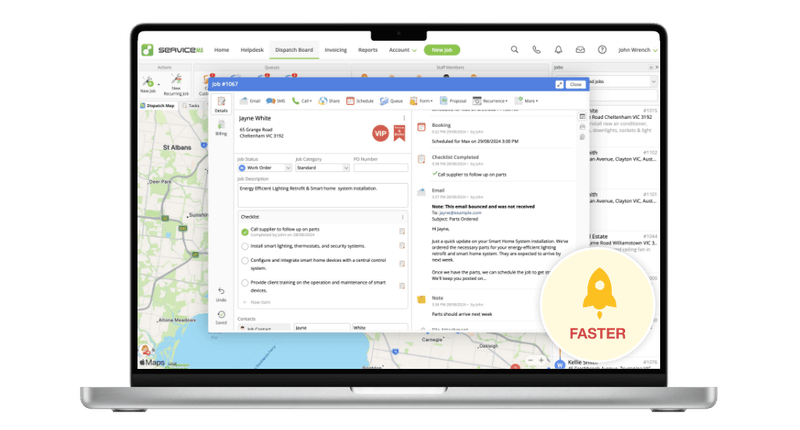
2. ServiceM8 Lite for Android
A simple, fast, and easy-to-use Android app designed for technicians, subcontractors, and temporary workers who need core job functionality on non-iOS hardware.

Key Capabilities:
- My Schedule & Job Cards: Techs can view jobs scheduled specifically to them, open job details, and access client info.
- Job Diary & Notes: View diary entries, photos, files, emails, and customer replies, plus add new job notes.
- Time Tracking: Check in and out to track travel and time on site directly to the job Diary.
- Checklists & Forms: Complete site checklists, required forms, certificates, and inspection reports on site.
- Media & Key Actions: Capture photos saved directly to the Diary, notify clients, and execute key job actions.
- ServiceM8 Network Updates: Subcontractors can receive, review, and convert Network Requests into jobs via the Lite Inbox.
3. Enhanced Job Card (Online Dashboard)
A dynamic, flexible redesign of the job card in the Web Dashboard, engineered for speed and ease of use.
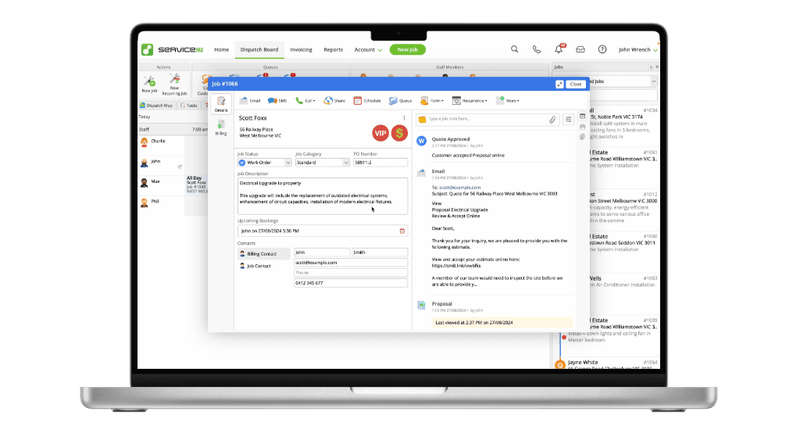
Key Capabilities:
- Auto Save & Undo/Redo: Changes are auto-saved in real time; built-in Undo and Redo buttons allow fast corrections.
- Auto Close & Navigation: Opening a new job card automatically closes the previous one, with color-coded border status indicators.
- Mini Tabs: Browse the Diary, Photos & Videos, or Attachments side-by-side while working in Details or Billing tabs.
- Expanding Text & Billing Fields: Job descriptions, line items, and invoice summaries expand dynamically as text is added.
- Keyboard Navigation: Single-click line item addition/removal and Tab key keyboard shortcuts for searching and adding items.
- Approve Invoice from Dispatch: Approve job invoices and payment details to accounting integrations directly from the Dispatch Board.
- Live Updates: Real-time sync reflects notes, photos, and item updates from field staff instantly.
4. Overhauled Checklists & Tasks
A complete redesign making checklists more flexible and integrating task management across web and mobile.
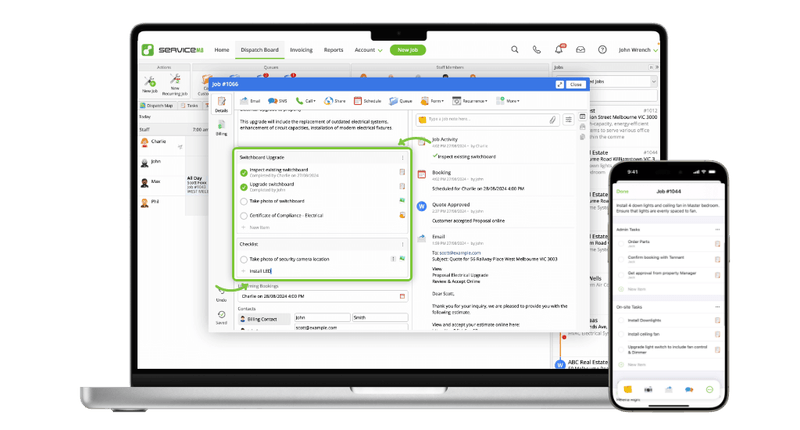
Key Capabilities:
- Online Completion: View, edit, drag-and-drop reorder, and complete checklists directly in the Online Dashboard.
- Forms & Asset Linking: Search and attach specific Forms, Assets, or entire Asset Types as required checklist tasks.
- Staff Assignment & Reminders: Assign tasks to specific staff members with reminders triggered on Navigating, Check In, Check Out, or a custom date/time.
- Multiple Checklists: Group requirements into category, stage, or area sub-lists within a single job.
- Smart Suggestions: Auto-suggests common checklist items when adding new tasks.
5. ServiceM8 Pay, Deposits & Payment Options
Built-in payment processing and deposit workflows engineered to protect cash flow and speed up payouts.
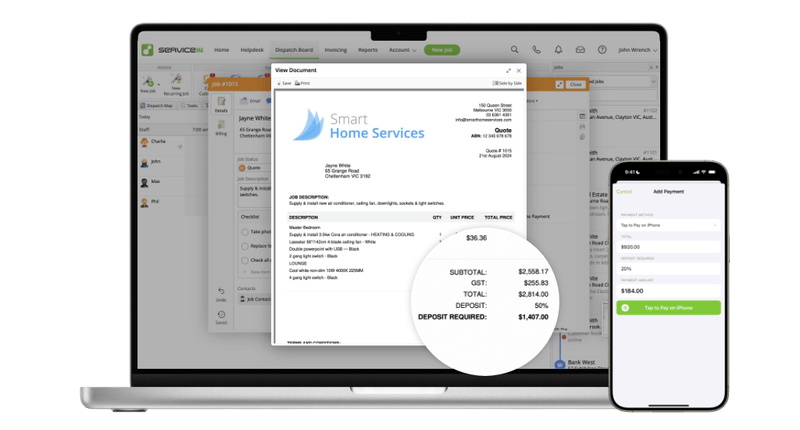
Key Capabilities:
- ServiceM8 Pay Add-on: Competitive processing rates with next-business-day bank payouts and automated Xero/QuickBooks Online reconciliation.
- Online & On-Site Deposits: Prompt clients for pre-payments upon online quote/Proposal acceptance, or collect deposit payments on site via iPhone.
- Deposit Rules: Set default deposit percentages, fixed amounts for proposals, or client-specific deposit rules.
- Pay by Bank Transfer: Fast, low-cost account-to-account bank payment options for clients in Australia and the UK.
- Tap to Pay on iPhone Expansion: Expanded contactless card acceptance on iPhone to the UK and Canada (alongside AU and US).
6. Proposals in Mobile App & AI Writing Tools
Bringing rich online quote creation to the iOS app, paired with enhanced AI copy writing assistance.
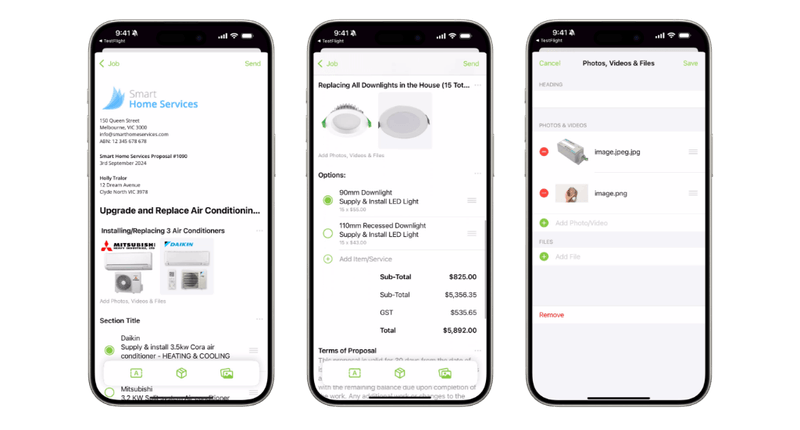
Key Capabilities:
- Mobile Proposal Builder: Create and send proposals on iOS featuring text sections, photo galleries, and optional/multiple-choice pricing items.
- Proposal Analytics: Track client view history (last viewed, view count) and receive notifications if a proposal isn't viewed within 24 hours.
- Smart Writing Helper: Select specific paragraphs or lines to auto-write, improve, lengthen, or shorten email and quote copy with full Proposal context awareness.
- Auto Quote & Auto Invoice on iOS: Draft work descriptions and billable item lists automatically inside the mobile app.
7. Editable Forms, Custom Badges & Admin Upgrades
Administrative enhancements for digitizing paperwork and customizing customer/job classifications.
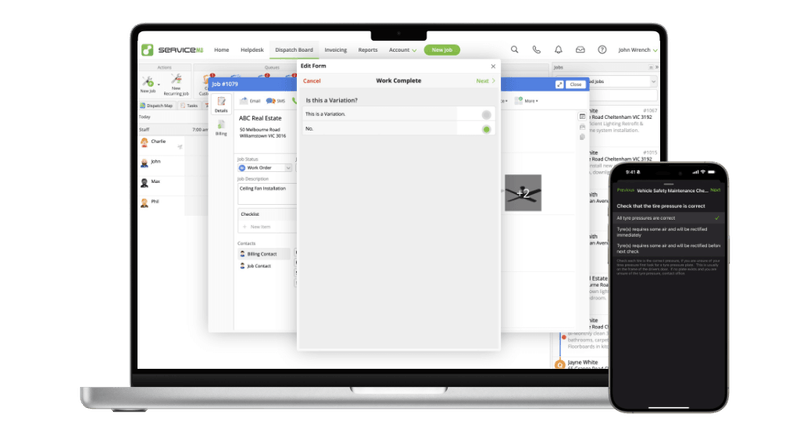
Key Capabilities:
- Editable Forms: Revisit and edit fields on completed forms directly from the job Diary without re-doing the entire form.
- Auto-Generated Templates: Create custom forms automatically without needing Microsoft Word.
- Form Store Access: Opened to all account tiers (including Free/Starter) with 250+ premade industry forms and try-before-you-buy previews.
- Custom Badges & The Burn List: Create custom visual badges with custom icons/colors; apply the Burn List badge to abusive or non-paying clients to trigger automatic creation warnings.
- Client Name Ordering: Toggle between Surname, First Name or standard First Name Surname display order.
8. iOS 18 Shortcuts, ServiceM8 Network & Voice AI Chat
System integrations and AI assistant upgrades to streamline field and subcontractor communication.

Key Capabilities:
- Control Centre & Action Button Shortcuts: Swipe down from iOS 18 Lock Screen to launch the ServiceM8 Camera, or map the iPhone Action Button to actions like Start Next Job or ServiceM8 Chat.
- ServiceM8 Network Upgrades: Subcontractor job requirements display as dedicated checklists, with chronological Network messages integrated into the Diary.
- Voice-Activated ServiceM8 Chat: Use voice prompts to send SMS templates, add billable items to job cards, request feature tips, or confirm undoable actions.
How to Activate ServiceM8 13
- Log into your ServiceM8 Online Dashboard via a web browser.
- Navigate to the ServiceM8 13 Activation Link in account settings.
- Review new features and click Activate ServiceM8 13.
- Update the ServiceM8 app on your iOS or Android devices via the Apple App Store or Google Play Store.
Frequently Asked Questions (FAQ)
What is ServiceM8 Lite for Android?
ServiceM8 Lite for Android is a fast, simple app designed for technicians, subcontractors, and temporary workers who need core job functionality — scheduling, job cards, checklists, forms, time tracking, and photo capture — on Android devices.
Can I collect deposits and payments with ServiceM8 Pay?
Yes! ServiceM8 Pay offers competitive processing rates with next-business-day bank payouts, automated accounting reconciliation, online and on-site deposit collection, and Pay by Bank Transfer options for Australian and UK clients.
What AI features were introduced in ServiceM8 13?
ServiceM8 13 introduced the Smart Writing Helper for auto-writing, improving, lengthening, or shortening email and quote copy, Auto Quote and Auto Invoice on iOS, and voice-activated ServiceM8 Chat for hands-free job management.
Watch the Launch Videos
For further updates and release breakdowns across all major versions, visit our blog archives covering ServiceM8 14, ServiceM8 15